
Sunday, March 10, 2013

Saturday, March 9, 2013
FCB1010 Ableton Setup Update (Yr Dying to Know)
So, bloody hell, I've finally got the FCB to start doing some of the things I bought it for. It's a bleeding miracle! Thanks to I've been able to switch guitar effects and synth sounds (coming from my G2M) as well as control the volume of the synths with the expression pedals. [refer to post "Control VST's with a Guitar-type Pedalboard: Update" for link to ceekghic's post]
Next on the list: set up pedals to fire loops, if possible set up one pedal to set tap tempo, and set expression pedals to control effects parameters without changing presets.
Here's a picture of squirrel getting ready to bowl:

Friday, March 8, 2013
Mapping Out FCB1010 Pt 2 (Duck Roll Call)
I've realized that it would be pointless to start programming the FCB1010 without figuring out all of the sounds that I need. So, I haven't touched the thing since yesterday and, instead, I've been mentally mapping out what I need with a few extras thrown in, in the utterly unheardof chance that the basics go really smoothly and fast. There is no chance so, pretty much, ignore anything that says "Sample," "maybe," or "try..."
Tuesday - None
Delay +Buzzy or Numan01 (Vol Right Pedal)
Student Loans - None
Chateau Nervoso - Ld +LowNuman01 (Vol Left Pedal) +Discovery Buzzy (V Right Pedal)
Ld +Dly +LowNuman01 (Vol Left Pedal) +Discovery Buzzy (V Right Pedal)
World of Douchebags - Dly
Sample - Bck Vox on Chorus (both notes)
Sample - Bck Vox Phrases (all three)
Souvenirs - None
Quiet
Chorus +Reverb (Level on Right Pedal?)
Sample - Delayed "solo"
Used Parts - Bit Crusher
Bit Crusher +Lead +Dly
Minimum Wage - None (or HiG)
None (or HiG) +Loud Dly (on Right Pedal, could that be a send? so the delays
continue after mute?)
Untouchable - Fuzz or HiGain (HiG)
HiG +Lead +Dly
HiG +GuitarRig3 "synthy effect"? (on Pedal)
or, HiG +Numan01 (or Pro-53 sound) with pitch control set on both pedals, i.e. Left
Pedal 0 to +12, Right Pedal 0 to an additional +12
Spome - HiG
HiG +Lead
HiG +Lead +Delay
Sample - Sample of guitar intro hits
Sample - Low "E"
It's Alright Now - None
Lead
Sample - Drum Noise
Sample - Create Mr. S Handclaps sample and trigger in 8th note pairs with a pedal? (Spome, Untouchable)
Here's a picture of a grasshopper eating. It reminds me of the pics I've taken for the official "Stuck Up" video.

Tuesday - None
Delay +Buzzy or Numan01 (Vol Right Pedal)
Student Loans - None
Chateau Nervoso - Ld +LowNuman01 (Vol Left Pedal) +Discovery Buzzy (V Right Pedal)
Ld +Dly +LowNuman01 (Vol Left Pedal) +Discovery Buzzy (V Right Pedal)
World of Douchebags - Dly
Sample - Bck Vox on Chorus (both notes)
Sample - Bck Vox Phrases (all three)
Souvenirs - None
Quiet
Chorus +Reverb (Level on Right Pedal?)
Sample - Delayed "solo"
Used Parts - Bit Crusher
Bit Crusher +Lead +Dly
Minimum Wage - None (or HiG)
None (or HiG) +Loud Dly (on Right Pedal, could that be a send? so the delays
continue after mute?)
Untouchable - Fuzz or HiGain (HiG)
HiG +Lead +Dly
HiG +GuitarRig3 "synthy effect"? (on Pedal)
or, HiG +Numan01 (or Pro-53 sound) with pitch control set on both pedals, i.e. Left
Pedal 0 to +12, Right Pedal 0 to an additional +12
Spome - HiG
HiG +Lead
HiG +Lead +Delay
Sample - Sample of guitar intro hits
Sample - Low "E"
It's Alright Now - None
Lead
Sample - Drum Noise
Sample - Create Mr. S Handclaps sample and trigger in 8th note pairs with a pedal? (Spome, Untouchable)
Here's a picture of a grasshopper eating. It reminds me of the pics I've taken for the official "Stuck Up" video.

Wednesday, March 6, 2013
Notes for Mapping Out My FCB1010 for Ableton
So, read this if you want to be bored or, if you are in The Inner Party and want to know what the hell I'm up to. It's just a web-accessible document for me to figure out how to set up my FCB1010. I decided to keep it public. Why the hell not?
Current Set:
Tuesday: A quiet setting, Delay, Maybe a high synth (CP_Numan01)
Student Loans: Nothing
Chateau Nervoso: Lead setting, Delay, Synth sounds (Minimoog Numan01 Low, and Discovery "Buzz" up an octave volume set on the second expression pedal, delay on the MM, Reverb on the Disc.)
World of Douchebags: Backing vocal samples triggered by pedals from an audio track, Maybe a high synth of some kind (Buzzy?) from G2M. Really want vocal effects too on this track. Maybe I'll try that on a later version of this setting.
Souvenirs: Quiet setting, Modulation and Reverb for "walkdown" parts (set reverb level to Expression Pedal 1 to nothing but reverb and try to emulate old Bunny Prole version?)
Used Parts: Bit Crusher or something similar, Make sample of keyboard noise from old IP setts and set up in Simpler hopefully controlled by G2M.
Minimum Wage: Really heavy delay (with mod?) for octave down parts in verses
Untouchable: Lead setting, Delay, Chorus on Ending?, High gain dist or fuzz maybe, Tryout that synthy sounding effect in GuitRig3 on last chorus, or Tryout high Numan01, or Pro-53 sound, on ending and break between verses and see how it reacts to chords (set to expression pedal for pitch, LPed bend +12, RPed bend another +12)
Spome: Normal volume setting, Lead setting, High gain dist or fuzz if it sounds good on my amp, Delay, Sample of guitar playing low E and the intro/outro "hits", Vocal effects would also be great on this song but we'll save that for a later incarnation
It's Alright Now: Lead setting for last verse on, Trigger sample of the drums from the original demo of the song on the ending.
So, I need:
1. A basic dry average volume setting.
2. A quiet setting.
3. A lead setting.
4. General delay.
5. Numan01 Low
6. Numan01 High, volume controlled by exp pedal.
7. Discovery "Buzzy" space sound, controlled by exp pedal.
8. Chorus
9. High-gain distortion or a good fuzz.
10. Chorus
11. Bit Crusher
12. Vocal samples for Douchebags
13. Ending drum sample for Alright.
14. Guitar low E sample and intro/outro "hits"
Got to think about this....
Here's a romance novel cover...

Current Set:
Tuesday: A quiet setting, Delay, Maybe a high synth (CP_Numan01)
Student Loans: Nothing
Chateau Nervoso: Lead setting, Delay, Synth sounds (Minimoog Numan01 Low, and Discovery "Buzz" up an octave volume set on the second expression pedal, delay on the MM, Reverb on the Disc.)
World of Douchebags: Backing vocal samples triggered by pedals from an audio track, Maybe a high synth of some kind (Buzzy?) from G2M. Really want vocal effects too on this track. Maybe I'll try that on a later version of this setting.
Souvenirs: Quiet setting, Modulation and Reverb for "walkdown" parts (set reverb level to Expression Pedal 1 to nothing but reverb and try to emulate old Bunny Prole version?)
Used Parts: Bit Crusher or something similar, Make sample of keyboard noise from old IP setts and set up in Simpler hopefully controlled by G2M.
Minimum Wage: Really heavy delay (with mod?) for octave down parts in verses
Untouchable: Lead setting, Delay, Chorus on Ending?, High gain dist or fuzz maybe, Tryout that synthy sounding effect in GuitRig3 on last chorus, or Tryout high Numan01, or Pro-53 sound, on ending and break between verses and see how it reacts to chords (set to expression pedal for pitch, LPed bend +12, RPed bend another +12)
Spome: Normal volume setting, Lead setting, High gain dist or fuzz if it sounds good on my amp, Delay, Sample of guitar playing low E and the intro/outro "hits", Vocal effects would also be great on this song but we'll save that for a later incarnation
It's Alright Now: Lead setting for last verse on, Trigger sample of the drums from the original demo of the song on the ending.
So, I need:
1. A basic dry average volume setting.
2. A quiet setting.
3. A lead setting.
4. General delay.
5. Numan01 Low
6. Numan01 High, volume controlled by exp pedal.
7. Discovery "Buzzy" space sound, controlled by exp pedal.
8. Chorus
9. High-gain distortion or a good fuzz.
10. Chorus
11. Bit Crusher
12. Vocal samples for Douchebags
13. Ending drum sample for Alright.
14. Guitar low E sample and intro/outro "hits"
Got to think about this....
Here's a romance novel cover...
Control VST's with a Guitar-type Pedalboard: Update
So, I've been spending a LOT of time the past two days googling my ass off. I finally got one thing to work yesterday. I got the FCB1010 to control Ableton.
Two things you should know if you want to control Ableton's interface with a FCB1010, both really simple but easy to overlook:
Using these two bits of info, I finally got the FCB1010 to turn channels off and on and can control the volume of channels with the expression pedals. I was also able to control an effect rack chain with the expression pedals; both using the standard MIDI mapping function in Ableton.
I think using some undecided-upon, and seemingly complex, Ableton-FCB1010 setup, I will be able to control both my guitar's effects and the VSTi's I'll be controlling with my G2M. I definitely will still be working on this for days to come. But, I did find this post which was helpful for some things and, so far, is the only thing I've found helpful searching for "Ableton as live guitar effects."
Ableton as live guitar effects
I hope somebody will find this little bit of info useful. It's wasted hours of my time to try and find it on my own.
Here's a picture of a chicken that will kick your ass at Tic-Tac-Toe.

Two things you should know if you want to control Ableton's interface with a FCB1010, both really simple but easy to overlook:
- Make sure that in Prefs>MIDI/Sync>MIDI Ports you have the "Remote" enabled for your MIDI input device. This very simple thing eluded me for hours.
- Make sure you have your FCB1010 pedals set to use only CC#'s between 22-31 and 84-90.
Using these two bits of info, I finally got the FCB1010 to turn channels off and on and can control the volume of channels with the expression pedals. I was also able to control an effect rack chain with the expression pedals; both using the standard MIDI mapping function in Ableton.
I think using some undecided-upon, and seemingly complex, Ableton-FCB1010 setup, I will be able to control both my guitar's effects and the VSTi's I'll be controlling with my G2M. I definitely will still be working on this for days to come. But, I did find this post which was helpful for some things and, so far, is the only thing I've found helpful searching for "Ableton as live guitar effects."
Ableton as live guitar effects
I hope somebody will find this little bit of info useful. It's wasted hours of my time to try and find it on my own.
Here's a picture of a chicken that will kick your ass at Tic-Tac-Toe.

Saturday, March 2, 2013
Control VSTi's With A Guitar-type Pedalboard?
I've been trying for a while now to figure out how to get some external midi gear to control things in Cubase 5 and Ableton. Part of the problem is that I'm using a Behringer FCB1010 midi foot controller, which apparently, can do most of what I need. But, programming it is a freaking bitch!
Here's what I'm trying to get control of. I have Sonuus G2M ver2 that I've been using to control VSTi's in Cubase. I want to have multiple instruments that can be played alone or as a stack along with the guitar; all at once. I want to be able to turn them off and on via footswitch.
Cubase is not designed for live uses, but I personally think it sounds better and I also know it much better than Ableton. I have used it in live situations in the past with success as my guitar effects rig but that was being controlled by Cubase internally by automation. This was possible because, at the time, the band was playing with a drum machine, also in Cubase.
It also can be controlled by outboard gear for recording purposes. Which would lead me to assume I could mute/unmute channels, control channel volume, etc. Which could be my solution. But I can't for the life of me figure out how, at least with the FCB1010. I also have a midi controller keyboard with programmable sliders that I think I can set to at least control track volume. That I haven't tried yet as it would be only a partial solution; I can't be playing guitar and simultaneously moving sliders on a keyboard.
I have had some minor success in Ableton switching things on and off with the FCB1010 but I emphasize the word 'minor.' One problem with that is that the FCB1010 can be set to turn a channel off and on but there is no feedback, i.e. there is no light that shows if it's active or not. The most success I had controlling Ableton was with a computer keyboard that I modified and then programmed Ableton to make the necessary changes when certain keys are stomped. Yes, i used a computer keyboard as a foot controller (I'll post on that setup sometime soon, as it worked well for some things and was a very very cheap solution.) All of the dedicated gear I have seen for Ableton seems specifically designed for DJs, not something I can control with my feet.
All the gear to control music software is made specifically for DJ's, guitarists, or recording engineers. I'm kind of stuck in the middle of them, wanting some of each.
Are there any dedicated Ableton controllers that are footswitches? Footswitches that aren't specifically designed to control guitar amp emulators? Am I overlooking something in Cubase? I've been wracking my brain here. So if anyone has had success with something similar to what I'm describing, your help would be greatly appreciated!
P.S.- I thought also about using two or more G2Ms along with A/B switches sent on different midi channels but the G2M only outputs to channel one. If anyone knows of a cheap hardware device that can take input data and output the same data to a different channel, that would be very useful too. I've been googling that for the past hour or so with no success.
Here's what I'm trying to get control of. I have Sonuus G2M ver2 that I've been using to control VSTi's in Cubase. I want to have multiple instruments that can be played alone or as a stack along with the guitar; all at once. I want to be able to turn them off and on via footswitch.
Cubase is not designed for live uses, but I personally think it sounds better and I also know it much better than Ableton. I have used it in live situations in the past with success as my guitar effects rig but that was being controlled by Cubase internally by automation. This was possible because, at the time, the band was playing with a drum machine, also in Cubase.
It also can be controlled by outboard gear for recording purposes. Which would lead me to assume I could mute/unmute channels, control channel volume, etc. Which could be my solution. But I can't for the life of me figure out how, at least with the FCB1010. I also have a midi controller keyboard with programmable sliders that I think I can set to at least control track volume. That I haven't tried yet as it would be only a partial solution; I can't be playing guitar and simultaneously moving sliders on a keyboard.
I have had some minor success in Ableton switching things on and off with the FCB1010 but I emphasize the word 'minor.' One problem with that is that the FCB1010 can be set to turn a channel off and on but there is no feedback, i.e. there is no light that shows if it's active or not. The most success I had controlling Ableton was with a computer keyboard that I modified and then programmed Ableton to make the necessary changes when certain keys are stomped. Yes, i used a computer keyboard as a foot controller (I'll post on that setup sometime soon, as it worked well for some things and was a very very cheap solution.) All of the dedicated gear I have seen for Ableton seems specifically designed for DJs, not something I can control with my feet.
All the gear to control music software is made specifically for DJ's, guitarists, or recording engineers. I'm kind of stuck in the middle of them, wanting some of each.
Are there any dedicated Ableton controllers that are footswitches? Footswitches that aren't specifically designed to control guitar amp emulators? Am I overlooking something in Cubase? I've been wracking my brain here. So if anyone has had success with something similar to what I'm describing, your help would be greatly appreciated!
P.S.- I thought also about using two or more G2Ms along with A/B switches sent on different midi channels but the G2M only outputs to channel one. If anyone knows of a cheap hardware device that can take input data and output the same data to a different channel, that would be very useful too. I've been googling that for the past hour or so with no success.
New Pics (Collaboration with Maryevelyn)
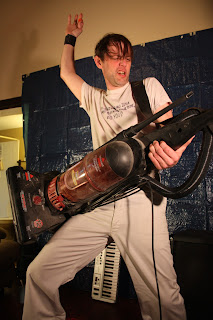
So, today, Maryevelyn, of Schmary-Schmevelyn and the Schmashters of the Schmuniverse fame, kindly came over with her fancy-pants camera and took some pics of me. It was a good idea. Here's some quickly chosen and very raw examples:




Subscribe to:
Posts (Atom)